LinkedIn Profile Tips for Freshers: Headline Examples, About Template and Checklist
MCS Team · 4 Nov 2026 · Career & Interview Prep
Key Takeaways
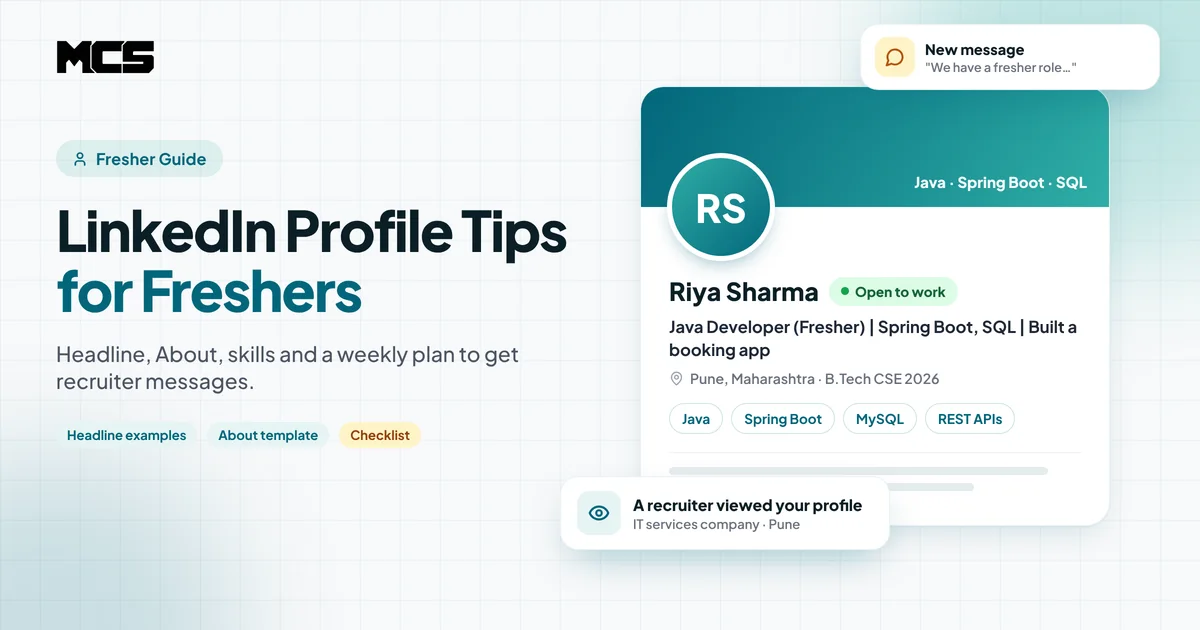
- Recruiters find freshers on LinkedIn by searching for a job title plus a few skills. If those words are not in your headline, About section and skills, you will not show up.
- Your headline is the most important line on your profile. Replace the default "Student at XYZ College" with your target role, 2-3 core skills and one proof point.
- Use a clear headshot, a simple banner, a custom profile URL and an About section that opens with who you are and what role you want.
- Freshers have little experience, so projects, internships, certifications and the Featured section do the heavy lifting.
- Turn on Open to Work with exact job titles and cities, then stay active for 15-20 minutes a few times a week. A complete, active profile gets far more recruiter attention than a silent one.
The best LinkedIn profile tips for freshers come down to one idea: make it easy for a recruiter to find you and quickly understand what you can do. Put your target role and core skills in your headline, write a short About section with real projects, list relevant skills, and switch on Open to Work for the exact roles and cities you want.
This guide walks you through each section of a fresher LinkedIn profile, with headline examples, an About template you can copy, a profile checklist and a simple weekly routine that helps you start getting recruiter messages. It works for B.Tech, BCA, MCA, B.Com and other graduates, though most examples are for IT and tech roles.
Table of Contents
- Why LinkedIn matters for freshers in India
- How recruiters actually find freshers on LinkedIn
- LinkedIn profile tips for freshers: section by section
- How to write a LinkedIn headline as a fresher
- LinkedIn About section for freshers: a template
- Common LinkedIn mistakes freshers make
- A weekly LinkedIn routine to get recruiter messages
- How My Career Solution helps
- FAQs
Why Does LinkedIn Matter for Freshers in India?
For an experienced professional, LinkedIn is a record of their career. For a fresher, it works more like a second resume that recruiters can find without you applying. Many HR teams and recruiters at IT services companies, product companies, startups and consultancies search LinkedIn when they need to fill entry-level roles fast.
A good profile helps you in three ways:
- Inbound messages: recruiters can find you through search and message you about openings you never saw.
- Trust when you apply: when you apply on a job portal or send a cold email to HR, many recruiters open your LinkedIn before they call. A complete profile backs up your resume.
- Referrals and networking: seniors and alumni are more likely to refer you when your profile clearly shows your skills and projects.
LinkedIn does not replace applying for jobs. Treat it as one channel next to job portals, company career pages and referrals. If you are not getting calls at all, read our full guide on how to get interview calls for freshers alongside this one.
How Do Recruiters Actually Find Freshers on LinkedIn?
Most recruiters do not scroll through random profiles. They type a search like "Java developer fresher Pune" or "data analyst SQL Power BI fresher", apply filters such as location and Open to Work, and then scan the results. In those results they see only your photo, your name, your headline and your location. If that small preview does not match what they need, they skip you.
That is why keywords matter more than clever wording. Think about what a recruiter would type to find someone like you, and make sure those exact words appear in:
- your headline (the most important place),
- your About section,
- your Experience and Projects entries,
- your Skills section.
Use the same role names that appear in real job posts. Browse a few current fresher openings on MCS Jobs, note the titles and skills that repeat, and use those words. "Associate Software Engineer", "Trainee Data Analyst" and "Frontend Developer (React)" are searchable. "Tech enthusiast" and "aspiring innovator" are not.
LinkedIn Profile Tips for Freshers: Section by Section
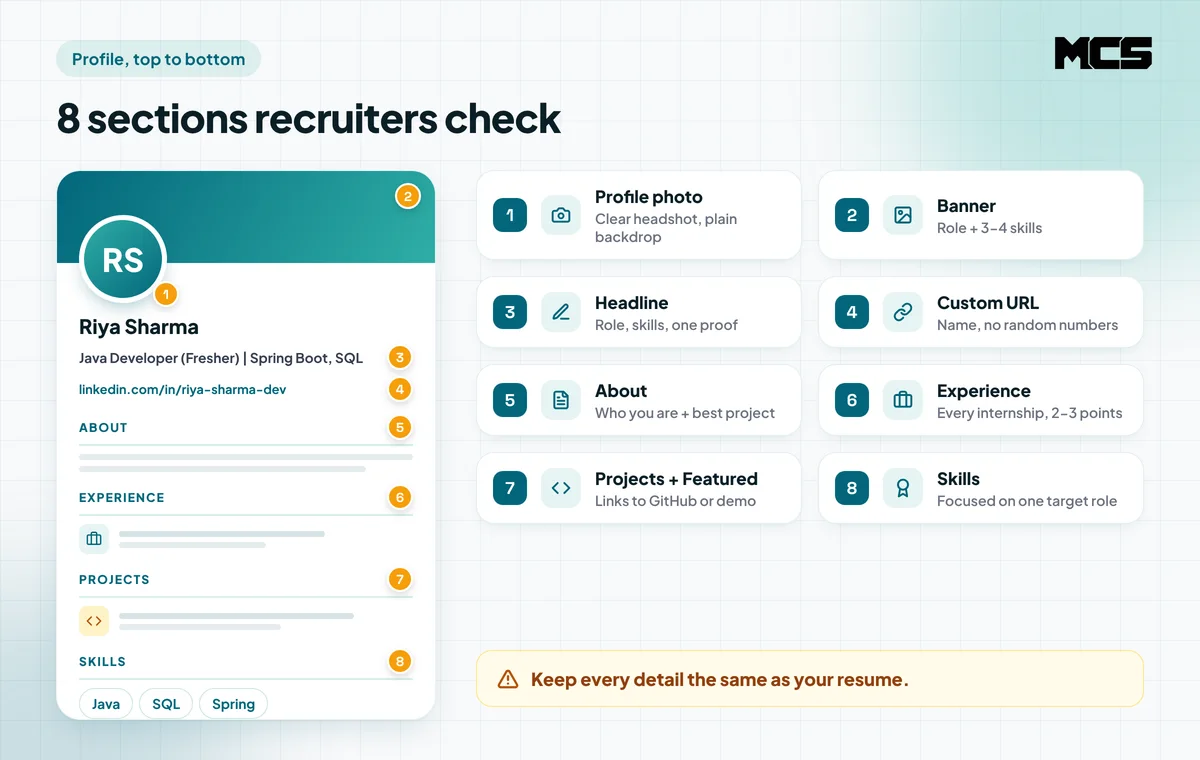
Work through your profile from top to bottom. Each section has one job, and together they should tell a recruiter what role you want and why you can do it.
1. Profile photo
Use a clear, recent headshot where your face fills most of the frame. A plain background, good daylight and a simple formal or smart-casual shirt are enough. Avoid group photos, selfies with filters, sunglasses and photos from a wedding. A phone camera is fine.
2. Banner (background image)
The banner is the wide image behind your photo. A simple banner with your target role and 3-4 skills, or a clean image related to your field, looks far better than the default grey. Keep the text away from the bottom-left corner, because your photo covers that area.
3. Headline
Your headline can be up to 220 characters, but search results and connection requests show only the first part, so put your target role and main skills at the start. We cover headlines in detail in the next section.
4. Custom profile URL
LinkedIn gives you a default URL with random numbers. Edit it from "Public profile and URL" to something like linkedin.com/in/riya-sharma-dev. A clean URL looks better on your resume and in emails.
5. About section
The About section can be up to 2,600 characters, but only the first few lines show before "see more". Open with your degree, target role and core skills, then add your best project and what you are looking for. A template is below.
6. Experience: internships, freelance and part-time work
Add every internship, even short or unpaid ones, and any freelance or part-time work that is relevant. For each, write 2-3 bullet points on what you built or did and the tools you used. Keep job titles and dates the same as your resume, because recruiters notice mismatches.
7. Projects, certifications and the Featured section
For freshers, projects are your proof. Add 2-4 strong projects with a one-line problem statement, your tech stack and a link to GitHub, a live demo or a short video. Put your best project or a short post about it in the Featured section, which sits near the top of your profile. Add certifications only if they are relevant to your target role.
8. Skills and education
List skills that match your target role, and keep your 3-5 most important ones as your Top skills so they show first. Ask classmates, project partners or internship managers to endorse them. In Education, add your degree, college, years and, if it is good, your score. Add relevant coursework or a final-year project here too.
Your resume and LinkedIn should tell the same story. If your resume still needs work, follow our ATS-friendly resume guide for freshers and the resume format for software developer freshers, then copy the same keywords and project details into LinkedIn.
How to Write a LinkedIn Headline as a Fresher
A strong fresher headline follows a simple formula: target role + 2-3 core skills + one proof point. The proof point can be a project, an internship, a certification or your degree.
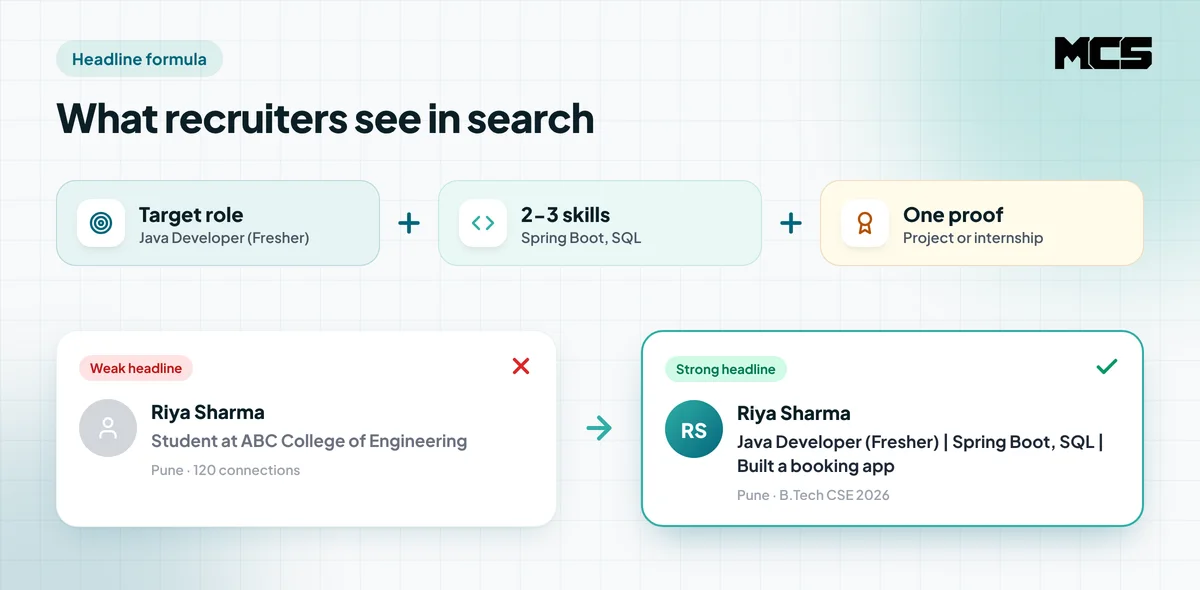
Here are fresher headline examples you can adapt:
| Target role | Example headline |
|---|---|
| Java developer | Java Developer (Fresher) | Spring Boot, SQL, REST APIs | Built a hospital booking system | B.Tech CSE 2026 |
| Frontend developer | Frontend Developer | React, JavaScript, Tailwind | 3 live projects on GitHub | Open to roles in Bangalore and Pune |
| Data analyst | Data Analyst Fresher | SQL, Excel, Power BI | Sales dashboard project | BCA 2026 |
| Software tester | QA / Software Tester | Manual Testing, Selenium, Java | ISTQB Foundation | Fresher |
| Cloud / DevOps | Cloud and DevOps Fresher | AWS, Linux, Docker | AWS Cloud Practitioner | Internship at a SaaS startup |
| Non-IT (finance) | Finance Graduate | Tally, GST, Advanced Excel | Accounts internship | Open to Accounts Executive roles |
A few rules for headlines:
- Start with the role, not with "Aspiring" or "Passionate". "Java Developer (Fresher)" is searchable; "Aspiring Java Developer" pushes the keyword back.
- Use the vertical bar ( | ) to separate parts so it is easy to scan.
- Do not write "Looking for job" or "Open to work" in the headline. The Open to Work setting already shows this.
- Only list skills you can answer interview questions on.
LinkedIn About Section for Freshers: A Template
Keep the About section short and specific: 4 short paragraphs or about 150-250 words is enough. Write it in first person and in simple English, because recruiters search in English keywords.
Copy this template and fill in your details:
I am a [degree] graduate from [college], [year], looking for [target role] roles in [cities or remote].
I work with [skill 1], [skill 2] and [skill 3]. My strongest project is [project name], where I [what you built and the problem it solves]. I used [tools] and [one result, such as "handled 200 test bookings" or "cut report time from 2 hours to 15 minutes"].
During my internship at [company type, such as "a fintech startup"], I [what you did].
Skills: [8-12 keywords from real job posts]. You can see my work at [GitHub or portfolio link]. Reach me at [professional email].
Only include results that actually happened. A recruiter or interviewer may ask about every line. If you get stuck, the structure is similar to a good "tell me about yourself" answer, which we explain in tell me about yourself answer for freshers.
Common LinkedIn Mistakes Freshers Make
Most fresher profiles fail for the same few reasons. Fixing them takes an evening.
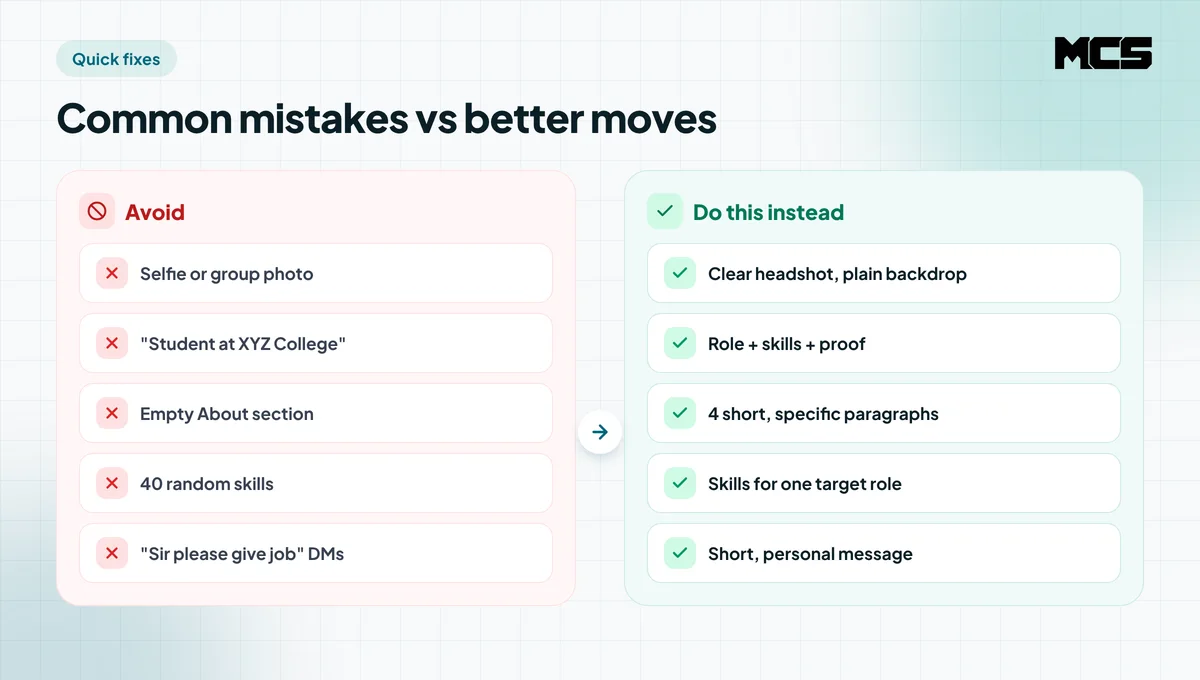
- Default headline: "Student at XYZ College" tells a recruiter nothing about the role you want.
- Empty About section: recruiters who open your profile have nothing to read and move on.
- Random skills: 40 unrelated skills (MS Word, Leadership, Photoshop, Java, Tally) blur your profile. Keep the list focused on one target role.
- No projects or links: without projects, a fresher profile has no proof of skills.
- Different details from the resume: mismatched dates, titles or CGPA look careless or dishonest.
- Spamming recruiters: sending "Sir please give job" or your resume to 100 strangers does more harm than good. Write short, specific messages instead.
- Paying for "guaranteed placement" on LinkedIn DMs: real recruiters never ask freshers for a fee to schedule an interview. Report such messages.
If your profile looks fine but recruiters still do not respond, the issue may be your resume or your applying strategy. Our guide on why you are not getting interview calls covers the most common reasons.
A Weekly LinkedIn Routine to Get Recruiter Messages
A complete profile gets you found. Activity keeps you visible. You do not need to post every day. 15-20 minutes, 3-4 days a week, is enough for most freshers.
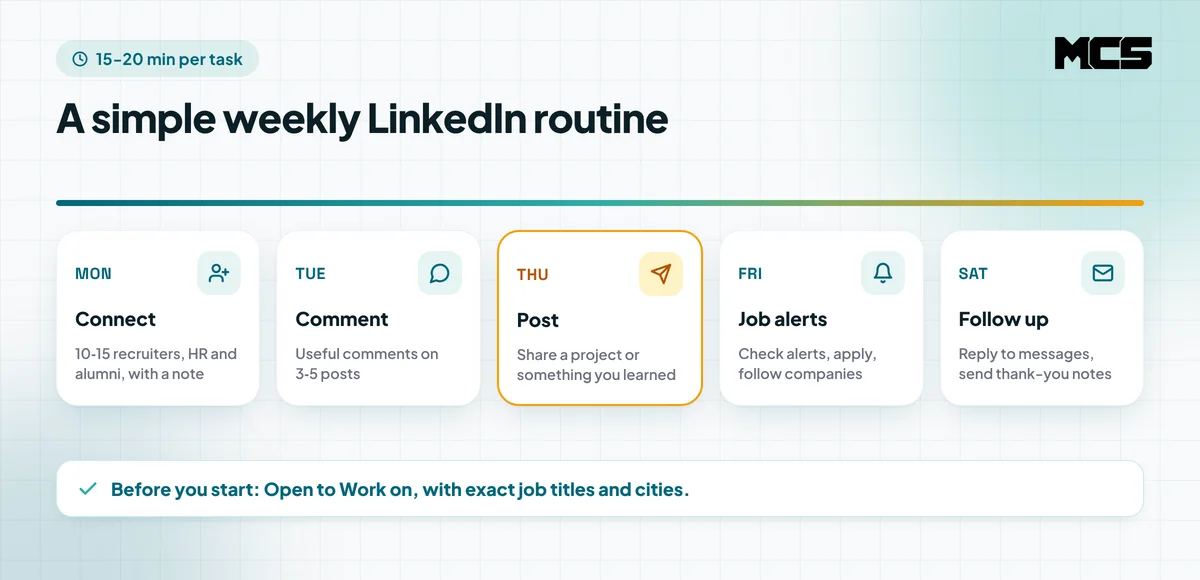
- Turn on Open to Work. Add 3-5 exact job titles, your preferred cities and "on-site, hybrid or remote". You can show it to all LinkedIn members (green photo frame) or only to recruiters. As a fresher who is not employed, showing it to everyone is usually fine.
- Connect with 10-15 relevant people each week. Focus on recruiters and HR at companies you want, alumni from your college working in your target role, and people from your internship. Add a one-line note: who you are and why you are connecting.
- Comment on 3-5 posts a week. Pick posts from people in your field and add something useful: a tip, a question or your experience. Comments put your name and headline in front of new people.
- Post once a week. Share what you built or learned: a project demo, a bug you fixed, a SQL query that saved time, or notes from a certification. Short posts with a screenshot work well.
- Follow companies and set job alerts. Follow companies you want to join and set alerts for your target titles and cities. For a quick view of which companies are hiring right now, check the MCS companies page.
- Reply fast and follow up. Reply to recruiter messages within a day. After an interview or a referral, send a short thank-you note.
Here is a simple message you can send to a recruiter after you connect:
Hi [Name], thanks for connecting. I am a 2026 B.Tech graduate looking for Java developer fresher roles in Pune. I have built [project] with Spring Boot and MySQL. If you have any fresher openings that fit, I would be glad to share my resume. Thank you.
Your LinkedIn profile checklist for freshers
- Clear headshot and a simple banner
- Headline with target role, 2-3 skills and one proof point
- Custom profile URL
- About section with role, skills, best project and contact
- All internships with 2-3 bullet points each
- 2-4 projects with links, and one in Featured
- Focused skills list with your top skills shown first
- Open to Work with exact titles and cities
- Same details as your resume
How My Career Solution Helps
A strong LinkedIn profile brings some recruiters to you. But most fresher jobs still go to people who apply widely and reach the right HR at the right time. My Career Solution (MCS) helps with that part.
- Free applications to 5 companies: when you sign up and click the button on your dashboard, MCS sends your profile to 5 relevant companies for free.
- Guaranteed interview calls: MCS packages come with a guaranteed number of interview calls based on the package you choose. See the details on the packages page.
- Live jobs and company pages: browse current openings on MCS Jobs and check company ratings and open roles on the companies page.
- Real feedback from candidates: read what other job seekers say on our reviews page.
Use LinkedIn to get found and MCS to get in front of more companies. Find more guides on resumes, interviews and companies hiring freshers on the MCS blog.
FAQs
How should a fresher create a LinkedIn profile?
Start with a clear headshot, then write a headline with your target role and 2-3 core skills. Add a short About section, your education, every internship, 2-4 projects with links and a focused skills list. Finally, set a custom URL and turn on Open to Work for the exact roles and cities you want.
What should a fresher write in the LinkedIn headline?
Use the formula target role + core skills + one proof point, for example "Java Developer (Fresher) | Spring Boot, SQL | Built a hospital booking system | B.Tech CSE 2026". Avoid the default "Student at XYZ College" and avoid starting with words like "Aspiring".
Should freshers turn on Open to Work on LinkedIn?
Yes. Add exact job titles and cities so recruiters can find you through filters. If you are not working anywhere, showing it to all members is usually fine. If you are employed, you can choose to show it to recruiters only.
Can a fresher get a job through LinkedIn?
Yes, many freshers get recruiter messages, referrals and interview calls through LinkedIn. It works best as one channel alongside job portals, company career pages, referrals and direct applications, not as the only one.
How many skills should a fresher add on LinkedIn?
Add the skills that match your target role, usually 10-20 focused skills, and keep the 3-5 most important ones as your Top skills. Only list skills you can answer interview questions on.
Ready to get more interview calls? Sign up on My Career Solution to apply free to 5 companies, or see the MCS packages for guaranteed interview calls.
Frequently asked questions
How should a fresher create a LinkedIn profile?
Start with a clear headshot, then write a headline with your target role and 2-3 core skills. Add a short About section, your education, every internship, 2-4 projects with links and a focused skills list. Finally, set a custom URL and turn on Open to Work for the exact roles and cities you want.
What should a fresher write in the LinkedIn headline?
Use the formula target role + core skills + one proof point, for example 'Java Developer (Fresher) | Spring Boot, SQL | Built a hospital booking system | B.Tech CSE 2026'. Avoid the default 'Student at XYZ College' and avoid starting with words like 'Aspiring'.
Should freshers turn on Open to Work on LinkedIn?
Yes. Add exact job titles and cities so recruiters can find you through filters. If you are not working anywhere, showing it to all members is usually fine. If you are employed, you can choose to show it to recruiters only.
Can a fresher get a job through LinkedIn?
Yes, many freshers get recruiter messages, referrals and interview calls through LinkedIn. It works best as one channel alongside job portals, company career pages, referrals and direct applications, not as the only one.
How many skills should a fresher add on LinkedIn?
Add the skills that match your target role, usually 10-20 focused skills, and keep the 3-5 most important ones as your Top skills. Only list skills you can answer interview questions on.